
Al Quran - Read Quran Offline
genie islamLibraries & Demo
4.225.00 Reviews
- Version
- 1.3.0
- Installs
- 1.00M
- Age Rating
- Everyone
Screenshots

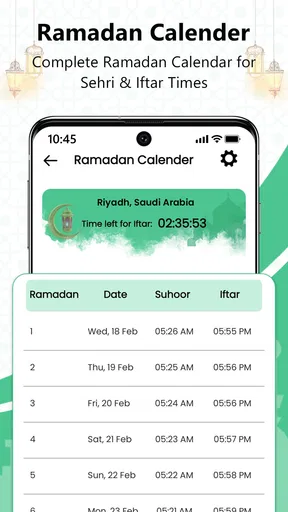
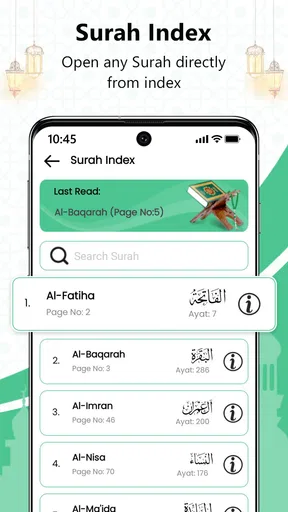
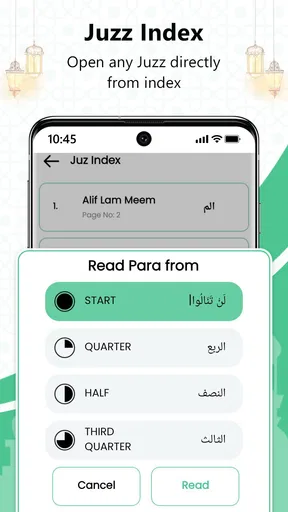
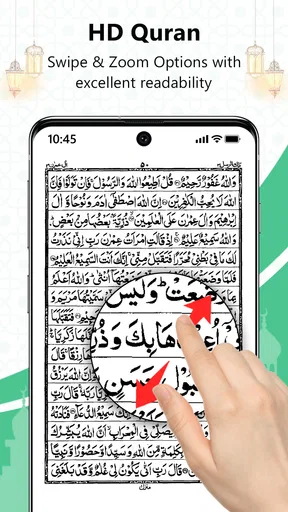

Our Review of Al Quran - Read Quran Offline
 Analysis by Appyee
When I want to read the Quran without relying on a connection, I prefer something that gets out of the way and feels close to using a physical copy. Al Quran - Read Quran Offline takes that straightforward approach. It is a free Quran-reading app from genie islam, listed in the Libraries & Demo category, and its main appeal is simple: I can open it and read offline in a layout intended to resemble a Quran in hand.
That simplicity is both its strongest quality and the main thing to understand before installing it. This is not the kind of app I would choose primarily for deep study tools, social sharing, or a large collection of learning utilities. I see it more as a portable reading companion. If your starting point is “I want the Quran available on my phone whenever I need it,” the app makes sense. If your starting point is “I need extensive commentary, advanced search, audio lessons, or a detailed memorization system,” you may find the experience too limited.
From opening the app to finishing a reading session
I’ll focus on the small transitions that make a reading session feel settled: getting the app ready before you need it, choosing a comfortable moment to read, and leaving yourself an easy way back to your place. In the next section, I’ll look at how those choices affect the overall pace without assuming the app has tools that aren’t established.
A practical beginning for offline reading
The most useful way to approach this app is to treat it as part of a small daily routine. I would install it before leaving home, open it while connected, and give myself a moment to become familiar with the page flow. After that, the important handoff is from the phone’s connection to the app’s offline reading experience. The store summary specifically presents it as a way to read offline, so its value becomes clearest when mobile data is unavailable, unreliable, or something I simply do not want to use.
That scenario is more common than it sounds. I might be travelling, waiting somewhere with poor reception, sitting in a quiet place where I want fewer distractions, or trying to keep a reading habit while conserving battery and data. Instead of searching for a web page each time, I can go directly to the installed app. The result is a less interrupted path from intention to reading.
The app is free to install, which lowers the barrier for someone who only wants a basic digital copy. It is marked for Everyone, making the presentation suitable for a broad audience. Optional in-app purchases range from $0.99 to $4.49 per item, so I would still check any purchase screen carefully rather than assuming every part of the experience is included at no cost.
Moving through the pages without overcomplicating the task
My preferred workflow with a reading app like this is deliberately simple: open it, locate the point where I stopped, read at a comfortable pace, and close it without turning the session into a technical project. The “like a real Quran in hand” idea matters here. A page-based experience can feel more natural than a long scrolling document because I can think in terms of pages and sections rather than an endless screen.
That design also changes how I use the phone physically. I would keep the brightness low enough for comfortable reading, hold the device in portrait orientation, and avoid switching between several apps during the session. These small choices help preserve the feeling of a dedicated reading moment. The app itself is not responsible for creating that discipline, but its focused purpose supports it better than a browser tab surrounded by unrelated content.
One practical tip is to decide in advance whether the phone is being used for reading or reference. If I am reading, I silence distracting notifications and keep the session short enough to remain comfortable. If I am checking a passage for a specific reason, I use the app as a quick reference and return to the task. Separating those two modes prevents me from judging a simple reader by the standards of a full research tool.
The handoff between a physical copy and the phone
Many people will not use this app instead of a physical Quran all the time. I would use it alongside one. A physical copy remains preferable when I want a larger, more stable page, a screen-free environment, or a familiar reading space. The phone becomes more useful when I am away from home or when carrying another book is inconvenient.
The handoff works best when I do not expect the two formats to behave identically. With a physical copy, I can leave it open on a surface and return to it visually. With the app, I need to manage the screen, battery, and interruptions. The advantage is portability; the trade-off is that a phone still feels like a phone, even when the app is focused on religious reading.
For a family member who is beginning to use a Quran app, I would recommend setting up the reading routine together rather than assuming the digital format will be self-explanatory. Show them how to open the app, where to continue reading, and how to avoid accidentally leaving the session. The app’s broad age rating makes it approachable, but ease of use also depends on the reader’s comfort with phone controls.
What the offline workflow changes in everyday life
The offline emphasis is more than a convenience. It changes the reliability of the habit. A web-based alternative can be excellent when the connection is strong, but it adds an extra step: open a browser, find the correct page, wait for content, and deal with whatever else is visible on the screen. An installed reader removes much of that friction. For a short reading session, those saved steps can be the difference between reading now and postponing it.
Consider a realistic evening scenario. I have a few quiet minutes before sleep, but I do not want to start browsing on my phone because that usually leads to unrelated notifications and pages. I open the app, continue from the section I intended to read, and put the phone aside when I finish. The outcome is not dramatic, but it is useful: the device supports the routine instead of competing with it.
The same workflow can help during travel. If a train moves through areas with inconsistent reception, an online reader may repeatedly become inconvenient. An offline app gives me a more predictable starting point. I would still charge the phone beforehand and avoid treating the app as a substitute for basic preparation, but the lack of dependence on a live connection is a meaningful advantage.
Where it sits among Quran apps and usual alternatives
Compared with a browser-based Quran page, this app is better suited to repeated reading because it is already on the device and is designed around a single purpose. Compared with a physical Quran, it is lighter and easier to carry, but less satisfying for readers who value paper, a larger page, or a screen-free ritual.
Compared with feature-heavy Quran applications, its appeal is narrower. Some alternatives are built around translations, tafsir, recitations, bookmarks, search, word-by-word study, or memorization plans. Those tools can be valuable when the goal is analysis or structured learning. I would choose this app when reading access and a straightforward page experience matter more than a large toolbox.
That distinction is important because a high rating does not automatically mean it is the right fit for every reader. The app holds an average rating of 4.3 from around 34 thousand ratings, and it has passed one million installs, which suggests that many people find its basic purpose worthwhile. I would read that as evidence of broad usefulness, not as a promise that it will replace every other Quran resource.
Small decisions that make the experience better
My first concrete recommendation is to use the app as a planned offline tool rather than waiting until the moment an internet connection fails. Open it while connected, confirm that the reading experience is ready, and then rely on it later. That simple handoff avoids discovering during a quiet moment that I have not yet learned how the app moves between pages.
My second recommendation is to create a physical stopping point. Instead of closing the app randomly, I would finish at a natural page or section and make a mental note of it. A page-oriented reader benefits from this habit because returning to a known point is easier than trying to reconstruct where I was from memory.
My third recommendation is to keep a separate study workflow when needed. If I want explanation, comparison, or detailed research, I would use a trusted reference alongside this app rather than forcing the reader to do both jobs. That division keeps the reading session calm while still allowing deeper study at another time.
A fourth trade-off concerns the phone itself. Offline access reduces dependence on connectivity, but it does not remove screen fatigue. For long sessions, a physical copy may be more comfortable. I would use the app for portability and short or medium sessions, then switch formats when my eyes or posture start to suffer.
Who will appreciate it most
I think this app is a good match for readers who want a dedicated Quran reader on Android, especially those who regularly find themselves without reliable internet. It also suits people who prefer a clean, focused routine and do not want to sort through a crowded collection of study features before beginning.
It can be useful for someone who is building consistency. The app does not need to make the routine complicated: the phone is already available, the reading material is kept in one place, and the offline angle removes a common obstacle. For a traveller, student, commuter, or anyone who moves between places during the day, that portability is practical.
I would be more cautious about recommending it to someone whose first requirement is audio. I would also point advanced learners toward a more specialized option if they need extensive interpretation, sophisticated searches, or a complete memorization program. Those readers may appreciate having this app as a simple reading copy, but it should not be their only tool.
Limits that can interrupt the flow
The main friction is the narrow scope. A basic offline reader can be wonderfully calm, but that calm comes from not trying to do everything. When I need to investigate a word, compare translations, listen to a recitation, or organize a study plan, I may have to leave the app and create a handoff to another resource. That breaks the single-app workflow.
The phone format can also introduce distractions that a physical copy does not. Notifications, calls, low battery, and accidental gestures are all part of the surrounding device experience. Muting notifications and preparing the phone before reading helps, but it does not make the screen identical to paper.
I would also pay attention to optional purchases. The app is free, while individual in-app items are listed between $0.99 and $4.49. That does not undermine the free reading proposition, but it means I would review what an item does before buying it and avoid assuming that a paid option is necessary for the core purpose.
Another point is platform expectations. The listed minimum operating system is Android 9, so I would check the phone’s Android version before planning to install it. The current version is 1.3.0, and the app was released on April 15, 2022. Those details are useful when deciding whether an older device is likely to fit the basic requirements, without confusing release history with the quality of the reading experience itself.
My final view after following the full workflow
From the initial need for accessible reading to the final offline session, the app delivers a clear outcome: I can keep a Quran reader close at hand without making connectivity the center of the routine. Its best quality is focus. It does not ask me to turn reading into a complicated project, and that makes it easy to recommend to someone who wants a portable, uncomplicated option.
At the same time, I would describe it honestly as a focused reader rather than a complete Quran study suite. The right choice depends on the handoff you need. If your journey starts with “I want to read anywhere,” this app is a sensible free starting point from genie islam. If it starts with “I want audio, commentary, detailed search, and structured learning in one place,” another app will probably serve you better.
For my own use, I would keep it as the offline reading option and pair it with a physical copy or a trusted study resource when the situation calls for more depth. The strongest reason to choose it is dependable simplicity: open the app, read, and continue your routine without needing a live connection. That is a modest promise, but it is a useful one, and the app stays closest to its purpose when I let it remain exactly that.
Privacy and Permissions
See what permissions an app requests and how it handles your data.
- Location
- approximate location (network-based), precise location (GPS and network-based)
- Wi-Fi connection information
- view Wi-Fi connections
- Other
- view network connections, full network access, run at startup, control vibration, prevent device from sleeping
Verdict
Strengths of Al Quran - Read Quran Offline
- Works fully offline after downloading the Quran content.
- Includes clear Arabic text suitable for daily reading.
- Search tools help locate verses and surahs quickly.
- Bookmarks make it easy to save important passages.
- Useful for maintaining a regular Quran reading routine.
Limitations of Al Quran - Read Quran Offline
- Some features may require extra downloads or permissions.
- Translation and recitation options can vary by language.
- Interface may feel basic compared with newer Quran apps.
- Ads may interrupt the experience in the free version.
- Users should verify the selected translation and recitation settings.
Similar Picks in This Category
View All
PGT: GFX, Launcher & Optimizer
Trilokia Inc.4.5

AusweisApp Bund
Governikus Service GmbH3.7

Cardboard
Google LLC3.2

Gamers GLTool with Game Tuner
Trilokia Inc.4.5

Multi Web Chat - Read Secretly
World Scan & Cleaner3.8

App Cloner Premium & Add-ons
App Listo1.9
Frequently Asked Questions
What is Al Quran - Read Quran Offline, and what does it offer?
Al Quran - Read Quran Offline is a mobile Quran-reading application designed for users who want access to the Holy Quran without depending on a constant internet connection. After the required content is downloaded, you can read verses offline, browse surahs, and use the app for personal study, reflection, or daily recitation. Available tools and presentation may vary by device and app version.
Can I read the Quran without an internet connection?
Yes, offline reading is the main purpose of this application. Once the Quran content has been installed or downloaded successfully, you should be able to open and read the surahs without mobile data or Wi-Fi. It is still advisable to launch the app while connected to the internet after installation, since some features, updates, advertisements, translations, audio files, or additional resources may require an online connection.
Does the app include translations, meanings, or audio recitation?
The app may provide additional Quran study features such as translations, explanations, bookmarks, search tools, or audio recitation, depending on the version available for Android or iOS. Users should check the app’s current store description and settings before downloading if a specific language, reciter, or translation is important. Some resources may need separate downloads or an active internet connection.
Is Al Quran - Read Quran Offline free to download and use?
The application can generally be downloaded without an upfront purchase, but the exact pricing model depends on the platform and current release. Some versions may display advertisements or offer optional in-app purchases for extra functions, premium content, or an ad-free experience. Before installing, review the Google Play Store or Apple App Store listing carefully to confirm possible costs, permissions, and subscription terms.
Is the app suitable for regular Quran reading and religious study?
The app can be useful for everyday Quran reading because offline access makes it convenient during travel, in places with weak connectivity, or when you want to avoid using mobile data. However, users who need scholarly commentary, verified translations, advanced memorization tools, or formal religious guidance should treat the application as a reading aid rather than a complete study resource. Always compare important interpretations with trusted sources.
